
We received the following alert on our facebook business page for the Seaside Gazette:
 “Dear Administrator,
Your Facebook Business Page may have experienced a potential security breach. We take responsibility for safeguarding your information and need to address this issue promptly.
Details of the incident:
Issue Detected: Unauthorized access to your page settings was attempted from an unrecognized location.
Steps to resolve the issue:
1. Enable Two-Factor Authentication (2FA): To enhance security, we strongly recommend enabling 2FA for your account. This will require an additional authentication step for access.
2. Secure your account now: https://facebook.com/l.php…
3. Approve Check Verification
Sincerely,
Meta security group”
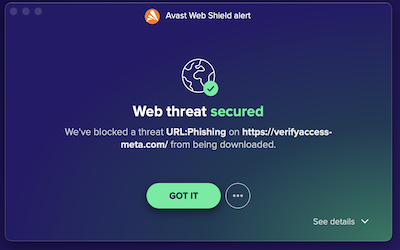
The trouble is, when we clicked on it, our anti-virus went haywire and said that it had blocked a phishing attempt. Therefore, Folks, be careful. Also, our 2FA was already enabled.
(New/Noticias: facebook message, phishing)
You should always check the link before clicking. In this case, the domain:
verifyaccess-meta.com
…sounds pretty sketchy. Anyone can buy a domain –>something-hyphen-meta.com<– with the something to make it sound legit. Like:
security-meta.com
verification-meta.com (this is actually available, if you fancy some scamming yourself)
For anything important – and especially when money is involved – it's best practise to always use your own links when you go to a site that you log into. Clicking on other people's links is risky stuff. I keep my links in an encrypted file that I store the passwords in, and never use any other links to log in.
Going back to your dodgy verifyaccess-meta.com link; looking up the WHOIS:
https://www.whois.com/whois/verifyaccess-meta.com
…shows that the domain is registered at GoDaddy (they're a popular, but somewhat seedy US webhost and domain registrar, and unlikely to be used by a company as heavyweight as Meta); and the domain was registered on 8th November 2023, so that's dodgy as well.
Remember also that it's possible for a link to read as one thing and send you somewhere completely different, as happened in this case. In Firefox you get a little popup on mouseover of a link showing you where the link actually goes before you click on it. Not sure what Chrome does.